 |
Matogen Content Management System |
Stand-Alone Pages
Stand-Alone pages are not part of the main menu or are linked to from within the content of your website.When you add a standard page it will be placed automatically in the main menu of the site. You should use a stand-alone page if for example you want to say on the page "Click here for more information" which links to another page.
You will see a dropdownbox at the top right of your screen when editing content. Selecting a page from this dropdownbox will automaticall place a link to it in the content you are currently editing.
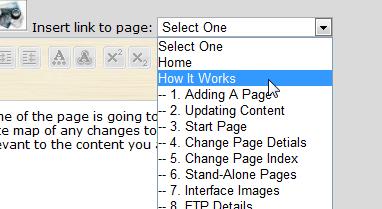
Home
How It Works
1. Adding A Page
2. Updating Content
3. Start Page
4. Change Page Detials
5. Change Page Index
6. Stand-Alone Pages
7. Interface Images
8. Publishing
Matogen.com2. Updating Content
3. Start Page
4. Change Page Detials
5. Change Page Index
6. Stand-Alone Pages
7. Interface Images
8. Publishing
Contact Details:
Cell: +27 (21) 887 3176| Copyright Matogen 2008-2009 |
|