 |
Pylogen Content Management System |
Add A Page
Adding a page to the content management system is very easy as long as you know what the name of the page is going to be. It is however important to remember that the R4-Content Management System informs Google via a site map of any changes to the website or any of its pages. It is therefore very important to use page names and titles that is relevant to the content you are going to add on the page.
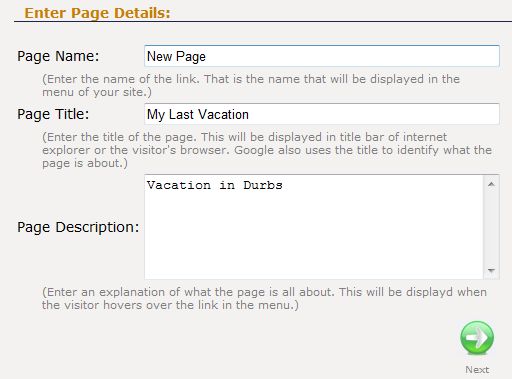
STEP 1: Enter Page Details
Page Name:
The page name is the name of the link that will appear in the menu. In essence, the page name must be a 2-4 word summary of the content of the page.
Page Title:
A developer has the option to place the page name, title and description anywhere on the master template. How you use it therefore depends on how it is used in your website. In most cases the Page Title will be displayed in the title bar of the visitor's browser and the description might be placed as an introduction paragraph for the page. Confirm which was placed where with your designer/developer before entering the details.
Page Description:
Most often used as introduction paragraphs to the page.
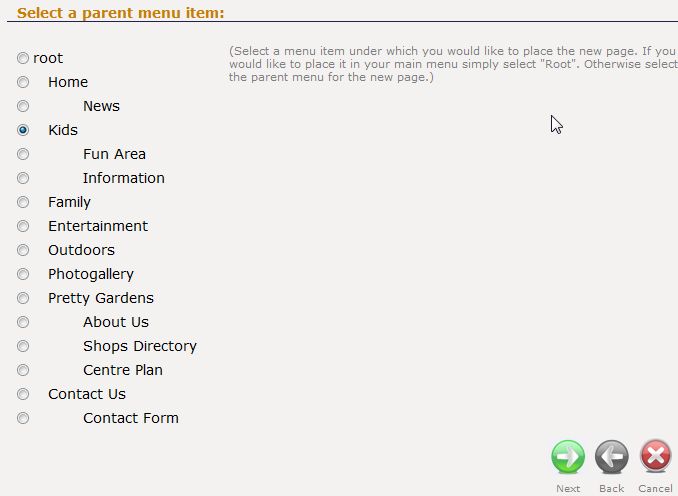
STEP 2: Select Menu Placement
The next step is to select the parent page of the new page. In many cases you would use a main menu as well as a sub menu and you might want to place this page below another.
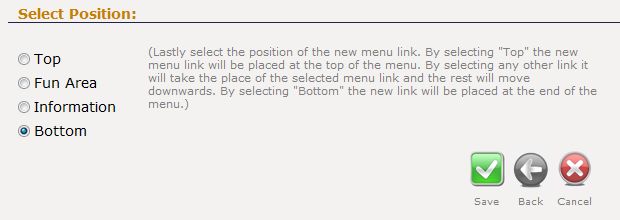
STEP 3: Select Menu Index
Finally select to index of the new page, whether it must be placed at the bottom, the top or taking the place of a current page.
Home
How It Works
2. Updating Content
3. Start Page
4. Change Page Detials
5. Change Page Index
6. Stand-Alone Pages
7. Interface Images
8. Publishing
Contact Details:
Cell: +27 (21) 887 3176| Copyright Matogen 2008-2009 |
|