 |
Matogen Content Management System |
Updating Content
Updating content is very easy especially since you edit the content as it would be on your website. Content areas are defined by your designer/developer as well as its type which makes uploading of things like images very easy. The content editor includes functionlity such as bold, italic, images, links, etc.
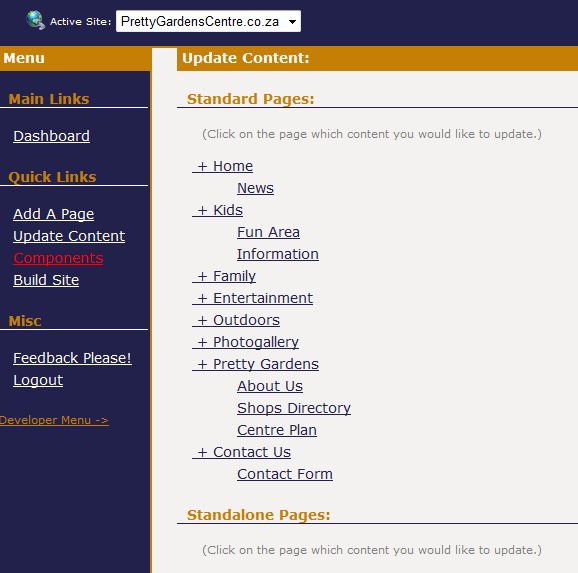
STEP 1: Select a Page to Edit
Click on the page you would like to edit.
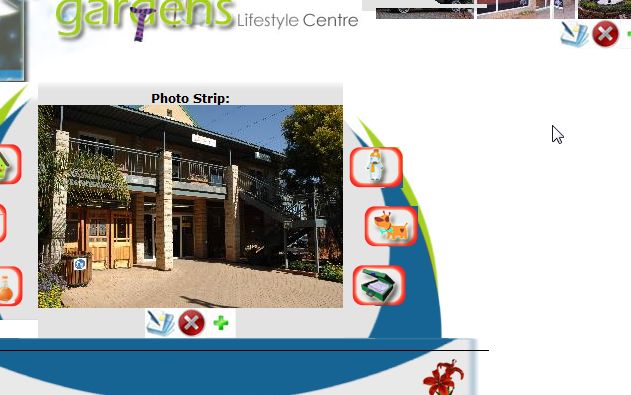
STEP 2: Select an Area
Click on the  edit icon next below the area you would like to edit.
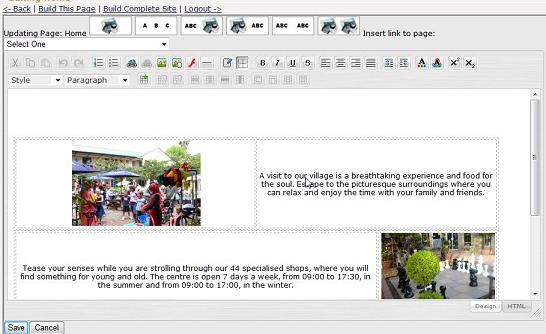
STEP 3: Edit Content
Use the editor to change to contents as desired.
STEP 4: Save & Build to Publish your changes!
Home
How It Works
1. Adding A Page
2. Updating Content
3. Start Page
4. Change Page Detials
5. Change Page Index
6. Stand-Alone Pages
7. Interface Images
8. Publishing
Matogen.com2. Updating Content
3. Start Page
4. Change Page Detials
5. Change Page Index
6. Stand-Alone Pages
7. Interface Images
8. Publishing
Contact Details:
Cell: +27 (21) 887 3176| Copyright Matogen 2008-2009 |
|